Skip to content
IOP Science

As a School Affiliate, how do I access my journal content?

Affiliated schools receive full access to Physics Education and Physics World via the IOPscience platform. After you receive an email from the IOP Publishing Customer Service team inviting you to activate your account, simply follow the steps provided.

How to log in:

Username: (Your registered email address)

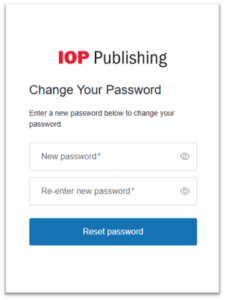
You will need to reset your password before logging into our content.

How to reset your password:

  1. On the IOPscience login screen, please use the ‘Reset your password’ feature.
  2. Follow the instructions sent to your registered email address.
  3. Once logged in, you will need to complete the short user-profile form when prompted.

You will then be able to access our content by using your confirmed login details.

Need help?

If having trouble accessing your content, please contact the IOP Customer Services team at and they will be happy to assist.

What are the benefits of being an IOP Member?

As an IOP Member, you will have opportunities to expand your knowledge and benefit from the support of a vibrant and far-reaching physics community. Membership provides access to the tools and resources that can help you progress in your chosen career, offering professional recognition and continuous development along the way.

What you can experience as an IOP Member:

  • Stay informed and inspired:
    • Keep up to date with the latest scientific discoveries through IOP conferences and specialised events
    • Access helpful materials from Physics World magazine including subject briefings, career guides and up to 30% off at the IOP Bookstore
    • Receive quarterly member newsletters and bi-weekly event bulletins
  • Grow your knowledge and career:
    • Explore a wide range of journals published by IOP Publishing
    • Gain recognition through professional registration, supporting your academic and career development
    • Join our University Student community, helping you immerse yourself in university life and take confident next steps
  • Connect and contribute:
    • Get involved with one of our 53 specialist interest groups across a variety of disciplines, interests and areas of practice
    • Volunteer your time to run National and UK/Ireland committees, supporting visits, talks and public activities

For further information on the benefits of becoming an IOP Member, please click the following link: IOP Member Benefits

If you have any further questions, please contact our Customer Service team.
As an IOP Member, how can I access my content?

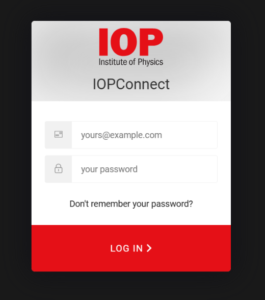
To access your related content on the IOP Publishing website, you will need to sign in to the IOP member portal which can be found on our Membership page. From here, you will be able to access our resources, manage your user profile and update or renew your membership.

How to Link Your IOP Connect Profile with Your physicsworld.com Account

Follow the steps below to connect your IOP Connect member profile with your physicsworld.com user profile:

  1. Sign in to your physicsworld.com account
    Head to your Physics World website and select Sign in at the top left of the page.
  2. Open your account settings
    Once signed in, choose My Account from the top left corner.
  3. Access the IOP membership section
    In the menu that appears, select My IOP membership (this is the second option in the list).
  4. Start linking your accounts
    Tick the box labelled ‘I am a member of the Institute of Physics (IOP)’.
    The green Next button will change to Link my accounts – click this.
  5. Enter your IOP Connect details
    You’ll be prompted to sign in using your IOP Connect
    These are the same details you use to access your IOP membership account and the digital Physics World magazine.

If you have any issues logging in, please contact our Customer Service team.
IOPscience User – How do I reset my password?

To reset your password, go to the Login page from the main IOPscience website.  Please follow these steps depending on your login account preference.

IOPscience User Account:

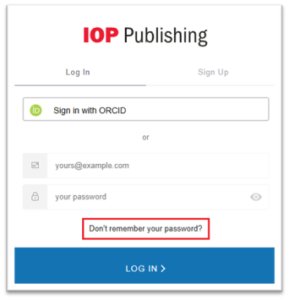
For this user type, please click on ‘Don’t remember your password’ link

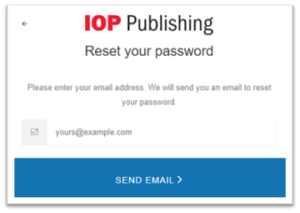
The following screen will be the ‘Reset your password’ page

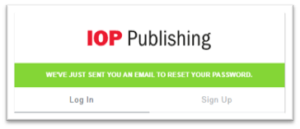
Enter the email address linked to your user account and click ‘Send Email’.

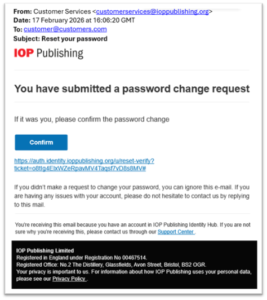
You will receive the following email:

Click ‘Confirm’ and you will be asked to enter a new password

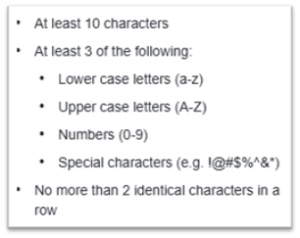
Please note that the password you enter must contain the following:

**You cannot reuse the same password as before**

ORCID User Account:

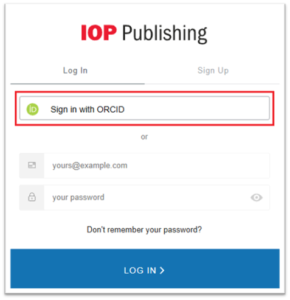
For this user type, please click on ‘Sign in with ORCID link

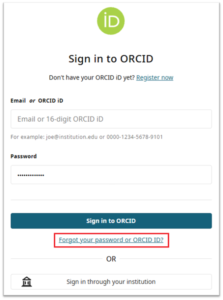
Click on the ‘Forgot your password or ORCID ID?’ link and follow the on screen instructions.

If you have any further questions, please contact our Customer Service team.
How do I get access to my institution’s paid subscription?

If your librarian has already confirmed that your institution subscribes to IOP Publishing content, you’re almost there. You can access the content on IOPscience in one of two ways: automatically through your institution’s network or by signing in through your institution.

Automatic access on campus (IP authentication)

If you are using a device connected to your institution’s network, we’ will recognise your IP address automatically.
That means:

  • No login needed
  • You’ll be able to open any subscribed articles and journals straight away

If you’re off campus but using your institution’s VPN, this may work the same way.

For a clearer explanation of how IP addresses work and why they matter for access, take a look at our ‘IP Address Glossary’ article. It breaks down the key terms and concepts so you can understand exactly what’s happening behind the scenes.

Signing in through your institution (Federated Access)

If your institution uses Shibboleth or OpenAthens, you can sign in with your usual institutional username and password.
Just:

  1. Visit IOPscience
  2. Select Access through your institution
  3. Search for your institution
  4. Sign in when prompted

Once you are signed in, you’ll have access to everything included in your institution’s subscription.

Not sure whether your institution has access?

If you haven’t checked with your librarian yet, or you’re unsure, please see our article: “How do I know if my institution has access to IOPP products?”


If you have any further questions, please contact our Customer Service team.
 

I have lost access, how do I get it back?

If you’ve suddenly lost access to some or all IOPscience journal or ebook content, there are a couple of quick checks that can help you get back on track.

  1. Confirm your institution’s subscription

Start by contacting your head librarian to make sure your institution still subscribes to IOPscience content. This is the fastest way to rule out any subscription changes.

If your librarian confirms that your institution does still have an active subscription, please move on to the next step.

  1. Contact Customer Services

Our Customer Services team can investigate access issues, and the more detail you can share, the faster we can help. When you get in touch, please include the following information:

  • Have you been able to access IOPscience content before?
  • When did you last have access?
  • Are you the only person affected, or are others at your institution experiencing the same issue?
  • Are you aware of any recent changes to your institution’s network (for example, VPN updates, firewall changes, or new IP ranges)?
  • Are you unable to access a specific article or journal, or is all IOPscience content unavailable?
  • Have you seen any error messages? If so, please provide the exact wording or attach a screenshot.

Sharing these details helps our team understand what’s happening and resolve your enquiry as quickly as possible.

If you have any further questions, please contact our Customer Service team.
IOPscience User – Can I change my email or personal details

To change your email address or update your personal details follow the steps below.

Go to the main IOPscience website and Login.

Update the required data and click ‘Update

Please note: For security reasons, when changing your email address, we will send you a validation email, for you to confirm that you are the owner of the mailbox.

If you have any further questions, please contact our Customer Service team.
As an JSFM member, how do I access my content?

As an JSFM member, you can access all related content through the IOPscience website.

If you are not yet a JFSM member

To join JFSM, visit the Join the JSFM page and follow the sign-up steps.

Once you’ve completed the signup process, the JSFM team will pass your details to our Customer Service team. We will then set up your access to the journal Fluid Dynamics Research (FDR). You’ll then receive an email with your access instructions.

Accessing FDR on IOPscience
You can find current and archived FDR issues here

As a member of the JSFM, you’ll have uninterrupted access to FDR content on IOPscience.

How to sign in:

  1. Go to the IOPscience login page, here
  2. Enter your username and password.

Once logged in, you’ll be able to view all FDR content years.

If you have any further questions, please contact the Customer Service team.

Can I set-up our institutional Branding Logo?

Yes. Your institution’s branding logo can be displayed at the top of every IOPscience page, above the IOP Publishing header.

Logo Requirements

To ensure your logo displays correctly across the site, please provide it in the following format.

  • Size: 600 pixels wide × 30 pixels high
  • Format: GIF
    These dimensions prevent distortion when the image is placed on the website.

Adding a link to your institution’s website

If you would like your logo to link directly to your institution’s website, please include the relevant URL when sending the file.

How to submit your logo

Email your completed Branding Logo (and optional URL) to  Customer Services . We will upload it and confirm once it is live for users at your institution.


If you have any further questions, please contact our Customer Services team.