Skip to content
IOP Science

As an LMS member, how do I access my content?

As an LMS member, you can access all your entitled content and our full archive through the IOPscience website.

How to access your LMS content

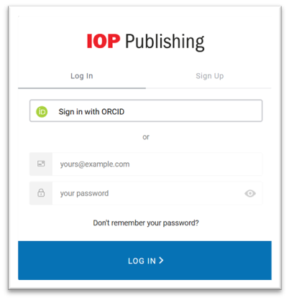
  1. Go to the IOPscience sign-in page.
  2. Enter the email address associated with your LMS membership.
  3. If you have not used IOPscience before, select Don’t remember your password at the bottom of the login page.

Once you have created your login credentials, you will be presented with a short form to complete your IOPscience user profile. You will only need to complete this on your first visit.

Need help?

If you need help accessing your subscription, please contact the Customer Service team at IOP Publishing.

As an IPEM member, how do I access my content?

How can I access your content:

To access our content, simply visit the IPEM website and select Login. Sign in using your IPEM membership details, and you’ll be able to search for any journals or research materials you need.

If you’re a Full Member or Fellow, you’ll benefit from single sign-on (SSO) – once you choose a title, you’ll be taken straight to the content without needing to log in again.

Accessing on IOPscience:

For Associate and Affiliate Active Members, you will need to login via our IOPscience website and will have uninterrupted access to Physics, Medicine and Biology.

  1. Head to the IOPscience login page.
  2. Enter your membership username and password.

If you need any help accessing your subscription, please contact the Customer Service team.

As an IPEM member, what content can I access?

Since forming a partnership in 1972, IPEM and IOP Publishing have continued to deliver high-quality resources to the medical physics and biomedical engineering community. Our content is designed for advanced learners, researchers and professionals, offering a wide range of publications in medical physics, biomedical engineering and related fields. It covers subject such as clinical engineering and diagnostic imaging, MRI, nuclear medicine, health informatics and psychological monitoring. It also explores radiation safety, rehabilitation technologies, and other forms of non-ionising radiation.

As an IPEM member, you will have full access to our Physics and Medical Engineering collections:

You will also have full access to a comprehensive collection of ebooks specialising in medical Physics and biomedical engineering. To discover more about our ebooks and browse the collection, please head to our IPEM Partner Series page.


If you have any further questions, please contact our Customer Service team.

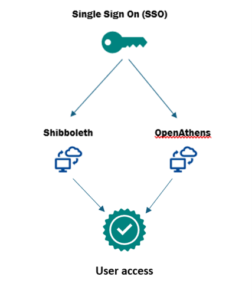
What is Shibboleth and OpenAthens?

OpenAthens and Shibboleth are SSO authentication systems that enables users to log in to online resources, e.g. Academic journals or databases. They let institutions and organisations manage their access in a centralised place, ensuring easy access for users. They are both widely used systems worldwide and are designed to make federated access simple, easy and accessible.

If you have any further questions, please contact our Customer Service team.

As a society member why can I not access my content?

What determines what you can access

Your society membership unlocks a specific set of entitlements. These usually differ in two ways:

  • Which journal(s) you can read
  • How many years of content are available to you

Because each society negotiates its own arrangement, two members logging in through IOPscience may see very different levels of access even though both are “society members.”

How access typically differs between societies

This is where most confusion comes from. Some societies provide access to one journal, while others include a full archive.

  • IPEM members — Access to Physics in Medicine & Biology (PMB)
    • Content years: 1956-2027
  • LMS members — Access to titles such as Nonlinearity
    • Content years: 1988-2027
  • ASP members — Access to Publications of the Astronomical Society of the Pacific (PASP),
    • Coverage: current year plus the previous ten years.
  • JSFM members — Access to Fluid Dynamics Research (FDR)
    • Content years: 1986-2027
  • IOP Members (full IOP membership) — Access to all IOP owned journals
    • Content years: all available content years (which is the broadest access we offer).

If you are expecting access to multiple journals or full archives but your society membership only includes one title or a limited range of years, the system will show restricted access because that reflects the entitlement set by your society.

How to check what you should have

If you’re not sure which society you’re a member of, or what your membership includes, there are a few easy ways to confirm:

  • Look at your society’s membership confirmation or welcome email
  • Check the membership benefits section on your society’s website
  • Review any login details the society provided for IOPscience

And if you’re still unsure, our Customer Services team can look up your membership type and confirm exactly what you should be able to access.

What is Federated access?

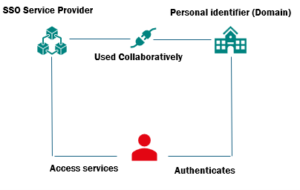
Federated Access is a single sign-on (SSO) method of Authentication used primarily by libraries and academic institutions. It enables access to digital resources through a unique and secure login that is provided to users by their institution. Providing the institution has registered their account, this trusted login will allow users access to multiple publishers and organisations across various platforms.

If you have any further questions, please contact our Customer Service team.

Can we use a proxy server to access our Subscribed Content?

Yes. Many institutions choose to route remote-user access through a proxy server. While this approach is common, proxy technologies vary significantly in how they are set up and maintained. Because of this, we are unable to provide formal support for proxy servers and cannot guarantee every proxy setup will work smoothly with our systems. If you experience access issues, please contact your proxy vendor’s support team for assistance.

Proxy IP Address Registration:

If your institution uses a proxy service, please share the proxy IP address(es) to the support team at TheIPRegistry. Once received, they will authenticate the IP information to enable access to your subscribed content.

Please note:

  • Only IP addresses registered solely to your institution can be added.
  • Shared or publicly used IP addresses cannot be registered.

If you have any further questions, please contact our Customer Service team.

What IP Addresses do you accept?

To ensure secure and reliable access, we require customers to provide valid IPv4 address ranges when requesting IP based authentication. This page explains the types of IP addresses we accept, which ones we cannot accept, and how to check the IP address your organisation is using.

Accepted IP Address Types:

✔️ IPv4 Addresses

We currently support IPv4 addresses in standard format

  • IPv4 addresses ‘Single’ – Example: 203.000.113.010
  • IPv4 address ‘Range’ – Example: 204.025.040.010 – 204.025.040.123

These addresses must be publicly routable on the internet.

IP Address Types We Cannot Accept:

❌ IPv6 Addresses

We do not currently accept IPv6 addresses or IPv6 ranges.
IPv6 addresses typically look like this: 2001:0db8:85a3::8a2e:0370:7334.

❌ Private IPv4 Addresses

Private IP addresses are used only within internal networks (e.g., office LANs, home networks). They are not routable on the public internet, so they cannot be used for authentication.

Common private IP ranges include:

010.000.000.000 – 010.255.255.255

172.016.000.000 – 172.031.255.255

192.168.000.000 – 192.168.255.255

If your IP address falls within any of these ranges, you will need to provide your organisation’s public IP address instead. This can be obtained from your institutions network administrator.

How to Check Your Current IP Address:

If you are unsure of the IP address your organisation is using, you can check it by visiting:

👉 https://iopscience.iop.org/checkup

This page will display the public IP address seen by our systems.
If you are part of a larger institution, this may be the IP address assigned by your network administrator rather than your individual device.

For a clearer explanation of how IP addresses work and why they matter for access, take a look at our ‘IP Address Glossary’ article. It breaks down the key terms and concepts so you can understand exactly what’s happening behind the scenes.

If you have any further questions, please contact our Customer Service team.

IP Address Glossary

IP (Internet Protocol):

What it is: A set of rules that allows devices to send data to each other across a network or the internet.
Why it matters: Every device needs an IP address so it can be identified and reached, much like a postal address for digital communication.
How it works: Data is broken into packets, labelled with source and destination IP addresses, and routed across networks until it reaches the right device.

***

IPv4 (Internet Protocol version 4):

What it is: The fourth version of the Internet Protocol and the most widely used addressing system on the internet.
Address format: Four numbers separated by dots, for example: 192.168.1.10.
Capacity: About 4.3 billion unique addresses.
Why it matters: IPv4 has been the backbone of the internet for decades, but the number of available addresses is limited, which led to the development of IPv6.

***

IPv6 (Internet Protocol version 6):

What it is: The newer version of the Internet Protocol designed to replace IPv4.
Address format: Eight groups of hexadecimal numbers separated by colons, for example: 2001:0db8:85a3:0000:0000:8a2e:0370:7334.
Capacity: Effectively unlimited—enough to give every device on Earth (and many more) a unique address.
Why it matters: Supports the growth of the internet, improves routing efficiency, and includes built-in security features like mandatory support for IPsec.

***

CIDR (Classless Inter‑Domain Routing):

What it is: A method for defining IP address ranges more efficiently than the old “class‑based” system.
How it works: An IP address is followed by a slash and a number that indicates how many bits of the address define the network. Example: 192.168.1.0/24.
Why it matters: CIDR helps reduce wasted IP space, improves routing, and is essential for modern network design and firewall rules.

***

Subnet (Subnetworks):

What it is: A smaller, logical section of a larger network.
Why it matters: Subnets help organise networks, improve performance, and control access by grouping devices.
Example: A company might split its network into subnets for staff, guests, and servers.

***

IP Address Range:

What it is: A block of IP addresses defined using CIDR notation.
Why it matters: Commonly used for firewall rules, access control lists, and routing decisions.
Example: 10.0.0.0/16 represents 65,536 IPv4 addresses.

***

Public vs Private IP Addresses:

Public IP: Routable on the internet and globally unique.
Private IP: Used inside local networks and not reachable from the internet.
Why it matters: Private IPs conserve public address space and improve security.


If you have any further questions, please contact our Customer Service team.

As a School Affiliate, what IOPP content can I access?

Once a member of the School Affiliate Scheme, you will have access to the following IOP content: 

  • Classroom Physics – a magazine published by the Learning and Skills department that includes news, resources and classroom ideas 
  • Physics World – An international monthly magazine covering all areas of physics. It is one of the largest Physic societies in the world and is aimed at those in research, industry and education. 
  • Physics Education An online journal aimed primarily at those teaching physics in secondary schools and colleges.  


To find out more information, please visit our School Affiliates page 

If you have any further questions, please contact our Customer Service team.