Skip to content
IOP Science

What if the data belongs to a third party?

If your study relies on data obtained from another organisation, institution or data provider, you may not have permission to share that data. 

In these cases, you should provide details of the source of the data and explain any restrictions on access. Where possible, you should also explain how other researchers may request access from the data owner. 

What if my research involves human participants?

If your research includes personal, confidential or sensitive information, you should ensure that any data sharing complies with relevant ethical and legal requirements. 

In some cases, data can be anonymised and shared. In others, access restrictions may be necessary. If data cannot be shared openly, this should be explained in your manuscript. 

What if I cannot share my data openly?

We recognise that it is not always possible to make research data publicly available. 

Reasons may include: 

  • Ethical restrictions 
  • Privacy or confidentiality concerns 
  • Legal or contractual obligations 
  • Commercial sensitivity 
  • National security considerations 

If data cannot be shared openly, you should explain the reason in your manuscript and, where possible, indicate how access may be requested or provided under controlled conditions. 

What repositories can I use to share my data?

We recommend depositing your data in a trusted repository that is appropriate for your discipline. Many researchers choose a subject-specific repository, while others use a general-purpose repository. 

Examples of widely used repositories include: 

  • Zenodo – a multidisciplinary repository for datasets, software, publications and other research outputs. 
  • Figshare – a general-purpose repository for sharing and citing research data and supporting materials. 
  • Dryad – a curated repository for research datasets across a range of disciplines. 
  • PANGAEA – a repository for earth, environmental and geoscience data. 
  • Environmental Information Data Centre (EIDC) – a repository for environmental science data. 
  • GenBank – a repository for nucleotide sequence data. 
  • GitHub (with Zenodo integration) – commonly used for sharing software, code and workflows. 

If you are unsure which repository is most appropriate for your research, repository discovery tools such as re3data.org can help you identify suitable repositories for your discipline. 

Your chosen repository should ideally: 

  • Provide a persistent identifier such as a DOI. 
  • Support long-term preservation. 
  • Enable data citation. 
  • Make data discoverable and accessible. 
  • Offer appropriate access controls where needed. 

If no suitable subject-specific repository exists, a general-purpose repository such as Zenodo, Figshare or Dryad is usually an appropriate option. 

When should my data be available?

The data supporting your article should be publicly accessible when your article is published. 

Many repositories allow you to deposit data before publication and keep it under embargo until your article is published. 

Do I have to share all of my research data?

You should make available the data that is needed for others to understand, verify or reproduce the findings reported in your article. 

This does not necessarily mean sharing every file created during your research project. The focus is on the data that supports the results and conclusions presented in your article. 

How can I access IOP Ebooks?

Here is my suggestion for a reword: The way you access IOP ebooks depends on your organisation and any subscriptions or memberships available to you. Use the guidance below to find the right access option.

***********************************************************

Institutional Customers

If you are affiliated with a university, research institution, company, or other organization, you may already have access to IOP ebooks through your institution’s subscription.

How to access

  • Visit the .
  • Access is typically provided automatically when connected through your institution’s network or authenticated access methods.
  • Subscribing institutions can download complete books in both PDF and ePub3 formats.

Not sure if your institution subscribes?

Contact your library or information services team, or with the name of your institution and we can confirm:

  • Whether your institution has an active IOP ebooks subscription.
  • Which ebook collections are included in that subscription.
  • How to access the available content.

If a required title is not available

If your institution does not subscribe to the ebook you need, you can recommend it to your library using our .

***********************************************************

Individual Customers

Individuals without institutional access can purchase ebooks directly for personal use.

How to access

  • Purchase ebook titles through the IOP Publishing Bookstore.
  • Purchased ebooks are available for personal use only.

Click here for IOP Publishing Bookstore.

If you require access for teaching, research groups, or wider institutional use, please recommend the title to your institution’s library instead.

Society Members

Members of participating societies are eligible for a discount on ebook purchases through the IOP Publishing Bookstore.

Eligible societies

  • Institute of Physics and Engineering in Medicine (IPEM)
  • American Astronomical Society (AAS)
  • Biophysical Society (BPS)
  • Institute of Physics (IOP)

How to access

  • Purchase ebooks through the IOP Publishing Bookstore.
  • Contact your society membership department to obtain your discount code.
  • Apply the code at checkout to receive a 30% discount on ebook purchases.

Click here for IOP Publishing Bookstore

Please note that ebooks purchased through the bookstore are for personal use only.

***********************************************************

 School Affiliates

The School Affiliation Scheme provides access to:

  • Physics World
  • Physics Education

However, it does not include access to IOP ebooks.

Alternative access options

Through your school

Schools can obtain an IOP ebooks subscription. Information about ebook subscriptions is available here.

Purchase a title individually

Individual ebook titles may also be available through online retailers and the IOP Publishing Bookstore.

Please note that individually purchased ebooks are for personal use only.

***********************************************************

IOP Members

Current Institute of Physics (IOP) members receive a discount on ebook purchases made through the IOP Publishing Bookstore.

How to access

  1. Visit the IOP Publishing Bookstore.
  2. Add your chosen ebook(s) to your basket.
  3. Enter the discount code IOPMEM30 at checkout.
  4. Select Apply Promotion to receive your 30% member discount.

Click here for IOP Publishing Bookstore

Important information

  • Ebooks purchased through the bookstore are for personal use only.
  • If you would like a title to be available for teaching or wider institutional use, you can recommend it to your institution’s library using the Book Recommendation Form

***********************************************************

Need Further Help?

If you are unsure which access route applies to you, please contact Customer Service team with:

  • Your customer type (Institutional, Individual, Society Member, School Affiliate, or IOP Member).
  • The title of the ebook you are trying to access.
  • The name of your institution (if applicable).

We will be happy to help identify the most appropriate way for you to access the content.

Can I get MARC records for IOP ebooks?

Yes. MARC records are available for all IOP ebooks and can be downloaded here.

Important Information

  • MARC records are available for all IOP ebooks.
  • Updates to MARC records are made monthly.
  • Each update file contains all records added during the previous month.
  • If there are no changes during a particular month, no update file will be published.

Need Help?

For any further questions about the MARC files available on the page, please contact:

discovery@ioppublishing.org

If you have any further questions, please contact the Customer Service Team.

How can I verify whether our IP address settings are configured correctly?

There are two ways to check that your IP address settings are configured correctly and that your updates are being shared with publishers:


Option 1: Check via theIPregistry.org

If your organisation has access to theIPregistry.org, you can log in and view the publishers that currently receive your IP address updates. This information is available within your organisation profile and provides visibility of which publishers are using your IP data.

You can also view the current list of participating publishers here: https://app.theipregistry.org/Home/ParticipatingPublishersAndPartners

Please note that only publishers who have completed their integration with theIPregistry.org and are successfully receiving updates will appear in this list.


Option 2: Contact Customer Services

If you do not have access to or choose not to use this service, please contact our Customer Service team. They will be able to provide details of all IP addresses currently authenticated on your account record.


Additional Information

As we now use theIPregistry.org for IP address management, publisher access to your IP data is controlled through the registry. Any updates made through theIPregistry.org are automatically shared with participating publishers that are subscribed to receive your organisation’s IP information.


If you have any further questions, please contact our Customer Service team.

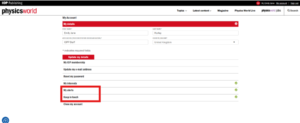
How to stop receiving Newswire alerts and Marketing mailing from Physicsworld.com

1)  Visit the physicsworld.com website and log in to your account.


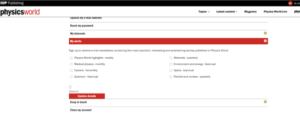
2)  To Unsubscribe from News alerts that you have set up on your account, go the ‘My Alerts’ section of the Menu screen


3)  The next page allows to select and deselect the alerts that are of interest to you.


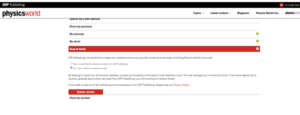
4)  To Unsubscribe from the Marketing Mailing list go to the ‘Keep in touch’ section on the menu page, where you will be able to select ‘No, I don’t want to receive emails.’

5)  Click Update details to save your changes


If you have any further questions, please contact our Customer Service team.