
Institutional Access
How do I know if my institution has access to IOPP products?
Please contact your Head Librarian, who can confirm whether your institution has access to IOP content. If access is available, they will also be able to share the correct instructions for logging in
Should you visit any article on the IOPscience platform and see the message shown below on the article page, it means that your institution does not currently hold a subscription to this content.
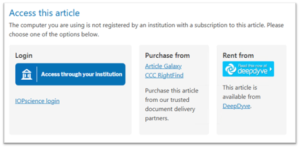
If you see the above message it could also be that you are outside of your institutions IP address range. Here’s how to get remote access: ‘Institutional login for remote and seamless access’
You can also use the link to the ‘Recommendation Form’, please complete this form and we will follow up with your librarian or Institution on your behalf.
For corporate researchers we can also follow up directly with your R&D manager, or the information management contact at your company. Institutional subscribers have access to the current volume, plus a 10-year back file (where available).
If you have any further questions, please contact our Customer Service team.
How do I get access to my institution's paid subscription?
If your librarian has already confirmed that your institution subscribes to IOP Publishing content, you’re almost there. You can access the content on IOPscience in one of two ways: automatically through your institution’s network or by signing in through your institution.
Automatic access on campus (IP authentication)
If you are using a device connected to your institution’s network, we’ will recognise your IP address automatically.
That means:
- No login needed
- You’ll be able to open any subscribed articles and journals straight away
If you’re off campus but using your institution’s VPN, this may work the same way.
For a clearer explanation of how IP addresses work and why they matter for access, take a look at our ‘IP Address Glossary’ article. It breaks down the key terms and concepts so you can understand exactly what’s happening behind the scenes.
Signing in through your institution (Federated Access)
If your institution uses Shibboleth or OpenAthens, you can sign in with your usual institutional username and password.
Just:
- Visit IOPscience
- Select Access through your institution
- Search for your institution
- Sign in when prompted
Once you are signed in, you’ll have access to everything included in your institution’s subscription.
Not sure whether your institution has access?
If you haven’t checked with your librarian yet, or you’re unsure, please see our article: “How do I know if my institution has access to IOPP products?”
If you have any further questions, please contact our Customer Service team.
I have lost access, how do I get it back?
If you’ve suddenly lost access to some or all IOPscience journal or ebook content, there are a couple of quick checks that can help you get back on track.
- Confirm your institution’s subscription
Start by contacting your head librarian to make sure your institution still subscribes to IOPscience content. This is the fastest way to rule out any subscription changes.
If your librarian confirms that your institution does still have an active subscription, please move on to the next step.
- Contact Customer Services
Our Customer Services team can investigate access issues, and the more detail you can share, the faster we can help. When you get in touch, please include the following information:
- Have you been able to access IOPscience content before?
- When did you last have access?
- Are you the only person affected, or are others at your institution experiencing the same issue?
- Are you aware of any recent changes to your institution’s network (for example, VPN updates, firewall changes, or new IP ranges)?
- Are you unable to access a specific article or journal, or is all IOPscience content unavailable?
- Have you seen any error messages? If so, please provide the exact wording or attach a screenshot.
Sharing these details helps our team understand what’s happening and resolve your enquiry as quickly as possible.
If you have any further questions, please contact our Customer Service team.
Can I get a KBART file of my institution's holdings?
Can I get a KBART file of my institution’s holdings?
Yes, KBART data is available for both IOP Publishing Journals and ebooks. The data can be requested or directly retrieved.
IOP JOURNAL KBART Requests:
To request a KBART file for either your institutional holdings or general platfrom data, please contact our Customer Service team who will assist you with your request.
IOP ebook KBART Requests:
We also make our title list available in KBART file format and split by Release and Collection for your convenience. The files you require are here
Please contact discovery@ioppublishing.org in case of any queries about the KBART files available on this page. here
Should you have any further questions, please contact our Customer Service team.
How do I set-up my institution to use OpenURL/SFX?
How do I set-up my institution to use OpenURL/SFX?
Institutions can enable OpenURL linking on the IOPscience platform to ensure seamless access via their preferred link resolver. To activate this feature, our customer service team will need a small amount of configuration information from you.
Information Required
Please send the following details for your institution’s OpenURL setup:
- Base URL — The main resolver URL used by your institution.
- Image URL — The URL for the resolver button or icon you would like displayed on IOPscience.
Once these details are received, our team will complete the configuration and confirm when OpenURL access is active.
What Happens After You Submit the Details
- Your institution’s IOPscience account will be updated with the OpenURL configuration.
- No further action is required unless clarification is needed.
- You will receive confirmation once the setup is complete.
Contacting Customer Service
Please send the required URLs to our Customer Service team, who will carry out the necessary administration. If you have any questions about locating your OpenURL details or how the configuration works on IOPscience, they will be happy to assist.
If you’d like, I can also create a shorter version for quick‑reference guides or an internal‑only version for staff use.